WordPress plugin · available now
Your WooCommerce store finally has a sales agent.
An AI sales agent that reads your WooCommerce catalogue live, advises, adds to the cart, answers about orders and picks up calls. Installed from WordPress, live within the hour.
AskParla AI Shopping Assistant for WooCommerce
That's the name you'll see in your WordPress admin. The plugin is the shop's end of Parla: the assistant runs on our servers, the plugin connects it to your catalogue, your cart and your orders.
WordPress 6.5+ · WooCommerce 8.0+ · PHP 8.0+ · HPOS compatible
See the plugin on WordPress.org- On the official WordPress.org directory
- No API key to buy: everything is included
- No card, no commitment
What it does on a WooCommerce store.
Nothing to export, nothing to sync: the plugin reads your products, variations and orders where they are.
It advises with your real products
Titles, descriptions, variations (sizes, colours), prices and stock, read live from WooCommerce. It compares, recommends a size with your guide, finds a gift under a budget.
It fills the real cart
“Put the M in navy in my cart” adds the right variation to the customer's WooCommerce cart, without leaving the conversation. All they have left to do is check out.
It answers about orders
Status, tracking, address change, return request. Only after checking the customer's order number and email, never before.
It picks up calls
A call button on your store: the customer talks, Parla answers out loud and shows product cards during the call. Standard voice with no minute limit, premium voice included.
It speaks 8 languages
French, English, Spanish, German, Italian, Dutch, Portuguese, Arabic. It answers in the customer's language, whichever language your store is in.
You see the results in your admin
Under WooCommerce → Parla: the sales it helped with, week by week, messages per day, what shoppers looked for and did not find, and who is waiting for a restock.
In your WordPress admin.
Everything is under WooCommerce → Parla. Screenshots from a demo shop, with sample data.
-
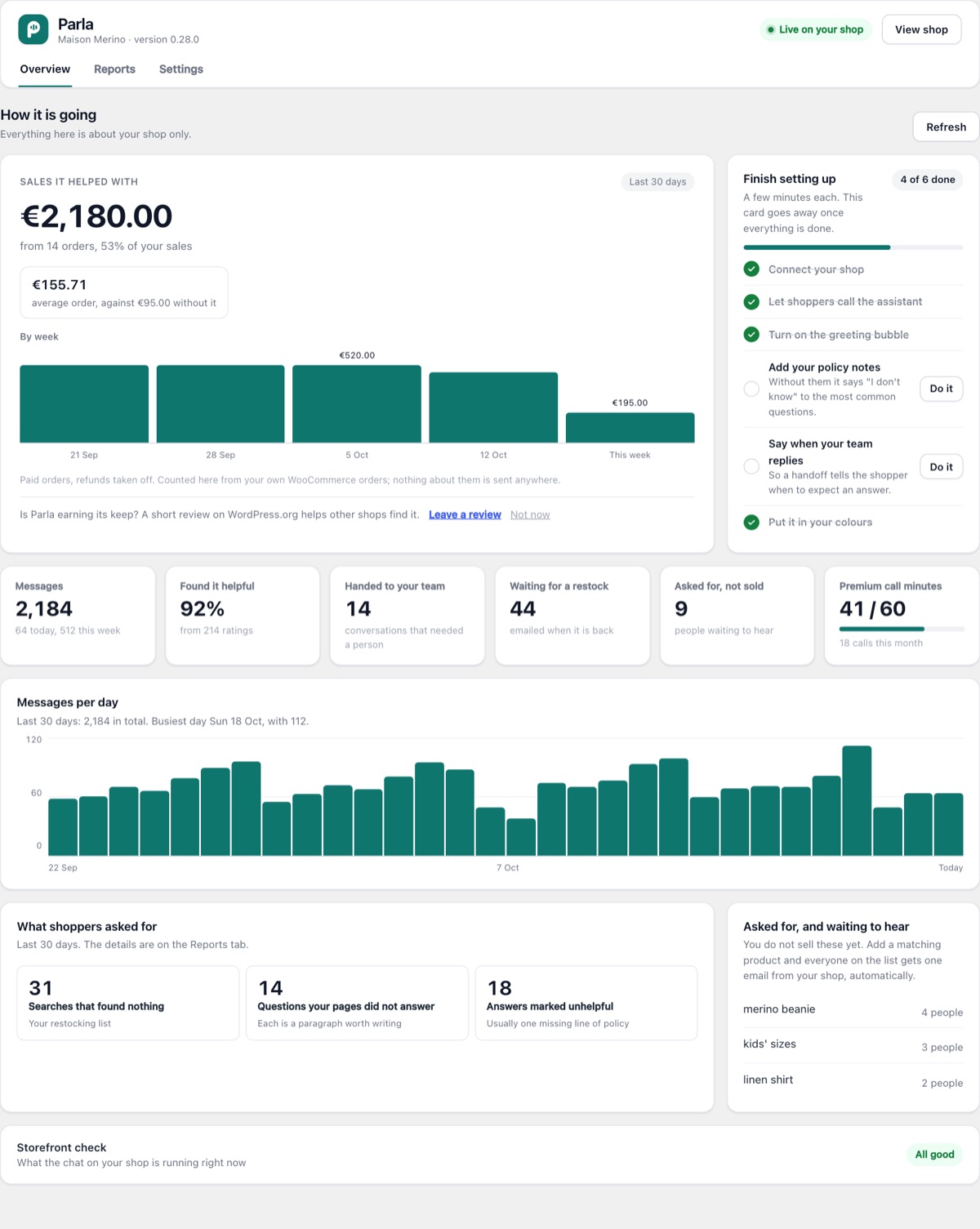
Overview
The sales it helped with, week by week, counted from your own orders. Then messages per day and what your shoppers asked for.
-
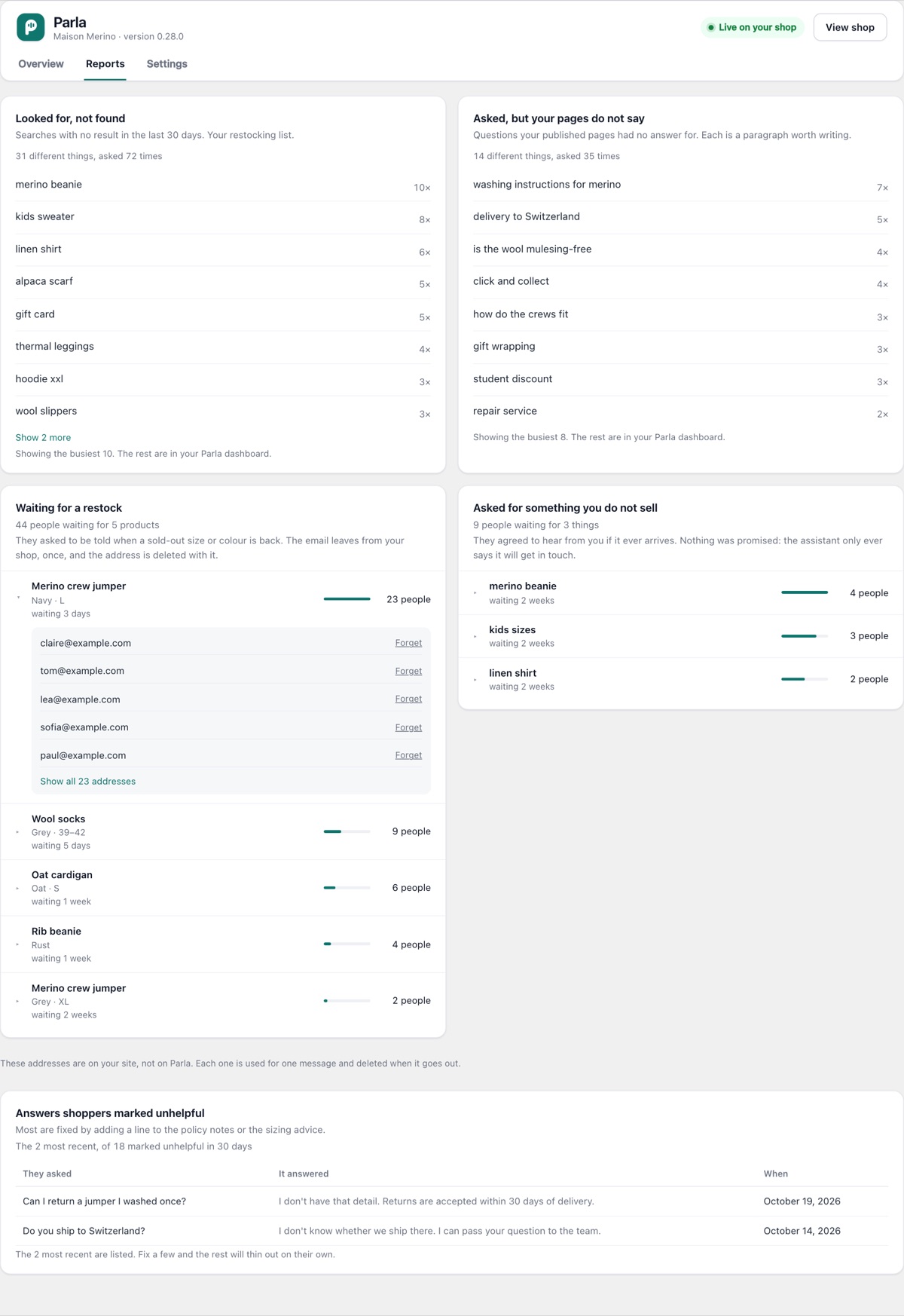
Reports
What shoppers looked for and did not find, the questions your pages did not answer, and who is waiting for a restock, by product.
-
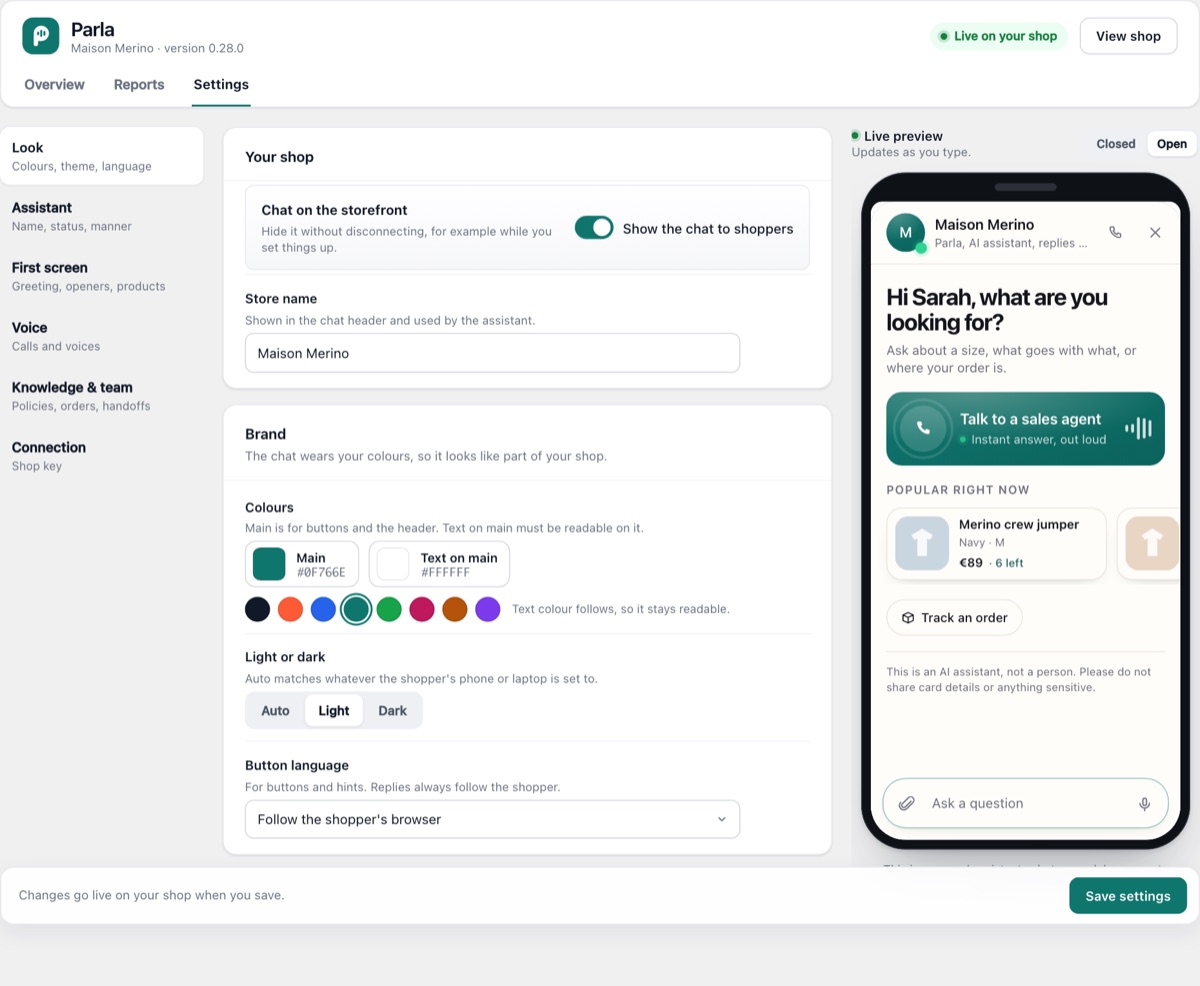
Settings
One page per job: look, assistant, first screen, voice, knowledge. The preview beside it shows the real chat while you change things.
Four steps, from WordPress.
No code, no theme to edit, no API key to buy.
- 1
Install the plugin
In your WordPress admin: Plugins → Add New, search for “AskParla”, install and activate. Or download it from WordPress.org.
- 2
Create your Parla account
On askparla.com, in a minute, with no card. Your shop key is shown straight away.
- 3
Connect the store
Under WooCommerce → Parla → Settings → Connection, paste the key and click “Connect store”. Parla reads your catalogue.
- 4
Make it yours
Under Settings: Look, Assistant and First screen for everything shoppers see, with a live preview; Knowledge & team for what it knows (size guide, returns, hours).
Built for WordPress, not bolted onto it.
- A single small script, loaded with
deferfrom our servers: your pages don't wait for it - Compatible with WooCommerce's High-Performance Order Storage (HPOS)
- Shows on any theme, bottom right, in your store's colours
- Your customers' addresses are masked before they reach the AI model
- It introduces itself as an AI assistant, in the chat header and at the start of every call
- Clean uninstall: the plugin removes what it wrote to your database
Questions about WooCommerce.
The other answers are in the full FAQ.
Which WordPress and WooCommerce versions do I need?+
Do I need to buy an API key or an AI subscription?+
Does it slow my shop down?+
Can I customise it?+
Install it on your WooCommerce store.
Free to start, no card. Plugin from WordPress.org, key in a minute, Parla answering within the hour.
A question about your store?
Your theme, a page builder, a multi-currency plugin, a special case: tell us, and a person answers within one working day. Or ask Parla, bottom right.